 +91-9884504322
Choose Your Course



Tally with GST
Learn Tally with us
A Tally course teaches you to use Tally software, a popular accounting tool for managing business finances, covering basics like ledgers/journals to advanced topics such as GST, inventory, payroll, and financial reporting (P&L, Balance Sheet). These courses, available online or offline, build essential skills for accounting roles, offering practical knowledge for students, professionals, and business owners to handle real-world financial tasks efficiently and boost career prospects.
What you Learn
- Introduction to Tally : Principles of Accounting, Maintaining Company Data, F11 Features, F12 Configure.
- Masters : Group - Ledger - Chart of Accounts - Stock Group - Stock Category - Unit of Measurement - Godown - Stock Item.
- Tally Vouchers : Accounting Vouchers - Inventory Vouchers.
- Reports : Balance Sheet - Profit & Loss Account - Ratio Analysis - Cash Flow - Fund Flow Statements - Ageing Analysis - Movement Analysis.
- Advanced Accounting : Bill wise Details - Cost Centres and Cost Categories - Voucher Classes - Cost Centre Classes - Multiple Currencies - Bank Reconcilation - Interest Calculation - Budgets & Scenario - Job Costing.
- Advanced Inventory : Order Processing - Reorder Levels - Tracking Numbers - Batchwise Details - Additional cost details - Bill of Materials - Price List - Export and Import of Data - Security Control.
Benefits of Tally Software Services for Retail Stores
1. Streamlined GST Compliance
Managing taxes can be tricky, but with Tally’s connected GST services, it becomes effortless. TSS helps you stay updated with the latest GST laws, ensuring your retail store remains compliant. You can seamlessly upload and file GSTR-1 and GSTR-3B data directly from Tally, saving time and reducing the risk of errors. This feature ensures that you don’t have to manually visit the GST portal every time, making tax management more efficient and less stressful for your retail business.
2. Automated E-Invoice and E-Way Bill Generation
One of the key advantages of Tally Software Services is its ability to generate e-invoices and e-way bills instantly, without any manual effort. For retail stores, especially those dealing with large volumes of transactions, this functionality can save hours of manual work. You can generate e-way bills for single or multiple invoices, and print the necessary QR codes and IRNs directly from Tally. This helps maintain a smooth invoicing process and ensures compliance with government regulations.
3. Remote Access for Store Owners
As a retail store owner, being able to manage your business from anywhere is crucial, especially if you own multiple locations. TSS offers remote access to your TallyPrime data, allowing you to track inventory, sales, and financials in real-time. Whether you’re at a different store or out of town, you can monitor the performance of your business at any time. This feature ensures that you never miss a critical update and can make quick decisions, even on the go.
4. Efficient Inventory Management
Retail store owners know that managing stock is a critical part of business. Tally’s inventory management tools, powered by TSS, offer real-time stock tracking, automatic reordering, and seamless integration with sales. With these features, you can easily track the movement of goods, avoid stockouts, and maintain optimal inventory levels. This leads to better stock control and can prevent lost sales due to unavailability of products, ultimately improving customer satisfaction.
5. Banking and Payment Integration
Tally Software Services simplifies banking and payment reconciliation. With integrated payment gateways like PayU and Razorpay, TSS helps streamline payments by generating payment links, adding QR codes to invoices, and reconciling transactions automatically. For retail stores that deal with numerous daily transactions, this integration saves time and minimizes human errors. You can easily track payments, manage your cash flow, and ensure smooth financial operations within your store.
MS Office
Common Software used for all purposes
Microsoft Office (MS Office) is a widely-used suite of productivity software from Microsoft, bundling essential applications like Word (documents), Excel (spreadsheets), and PowerPoint (presentations) to help users with tasks from writing and calculation to data management and communication. Launched in 1988, it has evolved from desktop versions to cloud-based platforms like Microsoft 365, becoming indispensable for personal, educational, and business environments by offering tools for diverse office needs.
What you Learn
WINDOWS : Computer Fundamentals - Introduction to OS - Wordpad - Note Pad - Paintbrush - Windows Explorer - Control Panel.
MS Word -- Creating Text and Documents - Indexes and Tables - Embedding Picture - Table Manipulation - Mail Merge - Macro.
MS Excel -- Formatting Cells - Charts - Pivot table - Data Table - forms - Scenarious - Goal seek - Macros and Modules.
MS Power Point -- Creating Presentations - OLE - Enhancing Presentation - Adding Audio & Video - Special Effects.
MS OUTLOOK -- Introduction - Creating Mail - Incoming and Sending Mail - Creating 2 or more mails in single outlook - Creating webbased mails.
MS ACCESS -- Introduction - Basic ideas for creating simple programs - Knowing about creating tables - Forms - Print Layout.
Core Applications & Functions
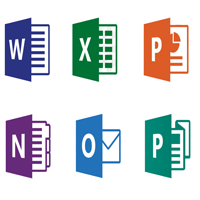
MS Word: For creating and editing text documents (letters, reports).
MS Excel: For calculations, data analysis, charts, and spreadsheets.
MS PowerPoint: For designing and delivering slideshow presentations.
MS Outlook: For email, calendars, contacts, and task management.
MS Access: A database management system for organizing large data sets.
MS Publisher: For desktop publishing and page layout design.
MS OneNote: For note-taking and organizing information.
Evolution & Availability:
History: First announced by Bill Gates in 1988, with the initial bundle including Word, Excel, and PowerPoint.
Versions: Evolved through many versions (Office 97, 2003, 2019) with added features and integration.
Modern Platforms: Now available as desktop apps (Windows, Mac), web versions (Office Online), and mobile apps (Android, iOS).
Microsoft 365: The latest subscription-based, cloud-connected version, offering continuous updates and online services.
Why It's Important
Productivity: Empowers users to create, analyze, and communicate effectively.
Integration: Applications share features like spell-check and data integration, making tasks smoother.
Versatility: Caters to a broad spectrum of users, from students to large enterprises.
Web Design
Complete Web builder software course
Web development refers to the process of building and maintaining websites and web applications that are accessible over the internet. It encompasses a wide range of tasks, from creating simple static web pages to developing complex dynamic web applications. Web development typically involves a combination of programming, markup languages, design, and server administration.
The basic requirements for web development include:
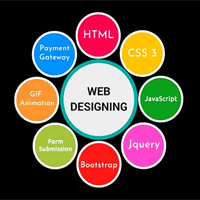
HTML (Hypertext Markup Language): The fundamental language used to create the structure and content of web pages.
CSS (Cascading Style Sheets): Used to style and format the HTML elements, giving the web pages a visually appealing look.
JavaScript: A programming language that adds interactivity and dynamic elements to web pages, allowing for user interactions and data manipulation.
Basics of HTML
HTML (Hypertext Markup Language) provides the structure and content of a webpage. It uses a series of elements and tags to define headings, paragraphs, images, links, forms, and more. Understanding HTML allows developers to create the backbone of a webpage and organize its content.
Basics of CSS
CSS (Cascading Style Sheets) is responsible for the presentation and layout of a webpage. With CSS, developers can control the colors, fonts, spacing, positioning, and overall appearance of HTML elements. By separating the content from its style, CSS promotes clean and maintainable code, as well as consistent design across different web pages.
Basics of JavaScript
JavaScript is a powerful scripting language that enables dynamic and interactive features on a webpage. With JavaScript, developers can handle user interactions, manipulate the content of a page in real-time, and communicate with servers to update information without requiring a full page reload. It plays a crucial role in modern web applications, making them more responsive and engaging.
What you Learn
WINDOWS : Computer Fundamentals - Introduction to OS - Wordpad - Note Pad - Paintbrush - Windows Explorer - Control Panel.
INTERNET : Introduction to Internet - www - http & Email - Creating Email ID - Receiving and Sending E-mail - Chatting - Locating information - Downloading.
HTML : Tags - Links - Anchor - Adding Picture - Lists - Tables - Frames - forms - Menu Controls - Front Page DHTML effects.
JAVA SCRIPT : Functions - Event Handling - Objects - Forms.
CSS : Functions - Data Handling - Code Creation - Colour Creation - Button Handling - Objects - Forms.
PHP : PHP Basics - Syntex - Data Types - Variables - Constants - Operators and Expressions - Control Structure - Functions - HTTP Headers.
Desk Top Publishing
Multi Level Designer Software
Desktop publishing (DTP) refers to the creation of documents using page layout software on a desktop computer. This process allows individuals and businesses to produce high-quality printed and digital documents, such as books, brochures, newsletters, and more, often with professional-level results. The evolution of desktop publishing has democratized the art of publishing by making it accessible to a broader audience. The term "desktop publishing" was coined in the 1980s with the advent of personal computers and laser printers. Before this period, publishing was a labor-intensive process that required specialized knowledge and equipment. The introduction of the Apple Macintosh in 1984, along with Aldus PageMaker and the Apple LaserWriter, marked the beginning of desktop publishing. These technologies made it possible for individuals to design and print documents with relative ease and affordability.
Page Layout Software
Software applications such as Adobe InDesign, QuarkXPress, and Microsoft Publisher are essential tools for desktop publishing. These programs offer a range of features, including text formatting, image manipulation, and page layout capabilities, enabling users to create complex and visually appealing documents.
Typography
Typography, the art and technique of arranging type, is a critical aspect of desktop publishing. Effective typography enhances readability and contributes to the overall aesthetic of a document. Desktop publishing software provides a variety of fonts and typographic controls to help designers achieve their desired look.
Graphics and Images
Incorporating graphics and images into a document can significantly enhance its visual appeal and effectiveness. Desktop publishing software allows users to import, manipulate, and integrate images and graphics seamlessly. This includes the ability to adjust image size, resolution, and placement within the document.
Printing and Output
Once a document is designed, it must be printed or exported for digital distribution. Desktop publishing software supports various output formats, including PDF, which is widely used for digital distribution due to its compatibility and ease of use. High-quality printing can be achieved using laser printers, inkjet printers, or professional printing services.
Applications of Desktop Publishing
Desktop publishing is used in a wide range of applications across various industries
Corporate Communications
Businesses use desktop publishing to create internal and external communications materials, such as newsletters, reports, brochures, and presentations. These documents help convey important information and maintain a professional image.
Marketing and Advertising
Marketing professionals leverage desktop publishing to design promotional materials, including flyers, posters, catalogs, and advertisements. Effective design can capture attention and drive engagement, making desktop publishing a valuable tool in marketing and advertising.
Education
Educational institutions use desktop publishing to produce instructional materials, such as textbooks, workbooks, and handouts. These resources support teaching and learning by presenting information in a clear and organized manner.
Self-Publishing
Aspiring authors and independent publishers use desktop publishing to create and distribute books, magazines, and other publications. This approach allows for greater control over the publishing process and can reduce costs compared to traditional publishing methods.
Advantages of Desktop Publishing
Desktop publishing offers numerous advantages, making it a popular choice for individuals and organizations
Cost-Effective
Desktop publishing reduces the need for expensive professional services and equipment, allowing users to create high-quality documents in-house. This can result in significant cost savings, especially for small businesses and independent creators.
Flexibility and Control
With desktop publishing, users have complete control over the design and production process. This flexibility allows for quick adjustments and revisions, ensuring that the final product meets the desired specifications.
Professional Quality
Modern desktop publishing software provides tools and features that enable users to produce professional-quality documents. This includes advanced typography, image manipulation, and layout capabilities.
Efficiency
Desktop publishing streamlines the design and production process, making it faster and more efficient. This is particularly beneficial for projects with tight deadlines or frequent updates.
Challenges and Considerations
While desktop publishing offers many benefits, there are also challenges and considerations to keep in mind
Learning Curve
Desktop publishing software can be complex and may require time and effort to master. Users must invest in learning the tools and techniques to achieve professional results.
Consistency and Quality
Maintaining consistency and quality across different documents can be challenging, especially for larger projects. Attention to detail and adherence to design standards are essential to ensure a cohesive and polished final product.
Hardware and Software Requirements
Effective desktop publishing requires adequate hardware and software. High-resolution images and complex layouts can demand significant computing power, and users must ensure their systems can handle these requirements.
Future of Desktop Publishing
The future of desktop publishing is likely to be shaped by ongoing technological advancements and evolving user needs. Emerging trends such as artificial intelligence (AI) and machine learning are expected to enhance desktop publishing software, making it more intuitive and powerful. Additionally, the increasing importance of digital media and online content distribution will continue to influence the development of desktop publishing tools and techniques.
Integration with Other Technologies
As desktop publishing software continues to evolve, it is expected to integrate more seamlessly with other technologies, such as cloud computing and collaborative platforms. This integration will facilitate real-time collaboration, remote work, and access to resources from anywhere.
Personalization and Customization
Advancements in data analytics and AI will enable more personalized and customized content creation. Desktop publishing software will likely incorporate features that allow users to tailor documents to specific audiences, enhancing engagement and effectiveness.
Sustainability and Eco-Friendly Practices
With growing awareness of environmental issues, desktop publishing is expected to embrace more sustainable and eco-friendly practices. This includes reducing paper waste, using eco-friendly printing materials, and leveraging digital distribution methods.
Desktop publishing has revolutionized the way documents are created and distributed, offering unprecedented accessibility, flexibility, and quality. As technology continues to advance, the capabilities and applications of desktop publishing will only expand, opening new possibilities for creative expression and effective communication. From its humble beginnings in the 1980s to its current status as a powerful tool for individuals and businesses alike, desktop publishing remains a vital and dynamic field, continually evolving to meet the needs of its users.
Diploma in Computer Application
The Diploma in Computer Application (DCA) from Focus Point is one of the most promising courses one can take up if looking at escalating the career graph. The course makes you proficient in Computer Science and Information Technology.
The course covers areas such as computer fundamentals, programming, database management, web development, operating systems, and office automation tools, making it highly suitable for beginners and working professionals seeking to enhance their technical skills. With the advent of digital technologies where our life has been impacted greatly and so is it’s career scope and available job opportunities. At present there are several branches of Computer Application that reserve the employment opportunity for many. Job roles like computer operators,data entry operators and office executives are some of the instances of employability.
DCA Syllabus & Core Subjects
What you Learn
WINDOWS : Computer Fundamentals - Introduction to OS - Wordpad - Note Pad - Paintbrush - Windows Explorer - Control Panel.
MS OFFICE : MS Word -- Creating Text and Documents - Indexes and Tables - Embedding Picture - Table Manipulation - Mail Merge - Macro. MS Excel -- Formatting Cells - Charts - Pivot table - Data Table - forms - Scenarious - Goal seek - Macros and Modules. MS Power Point -- Creating Presentations - OLE - Enhancing Presentation - Adding Audio & Video - Special Effects.
INTERNET : Introduction to Internet - www - http & Email - Creating Email ID - Receiving and Sending E-mail - Chatting - Locating information - Downloading.
HTML : Tags - Links - Anchor - Adding Picture - Lists - Tables - Frames - forms - Menu Controls - Front Page DHTML effects.